All Deposits Detail
Report Parameters
|
Field |
Description |
|---|---|
|
Report Name |
The name of the report. |
|
Start Date |
The start date from when the data must be considered for generating the report. |
|
End Date |
The end date until when the data must be considered for generating the report. |
|
Print All Deposits |
When enabled, details of all deposits will be included in the report. |
Sample Report
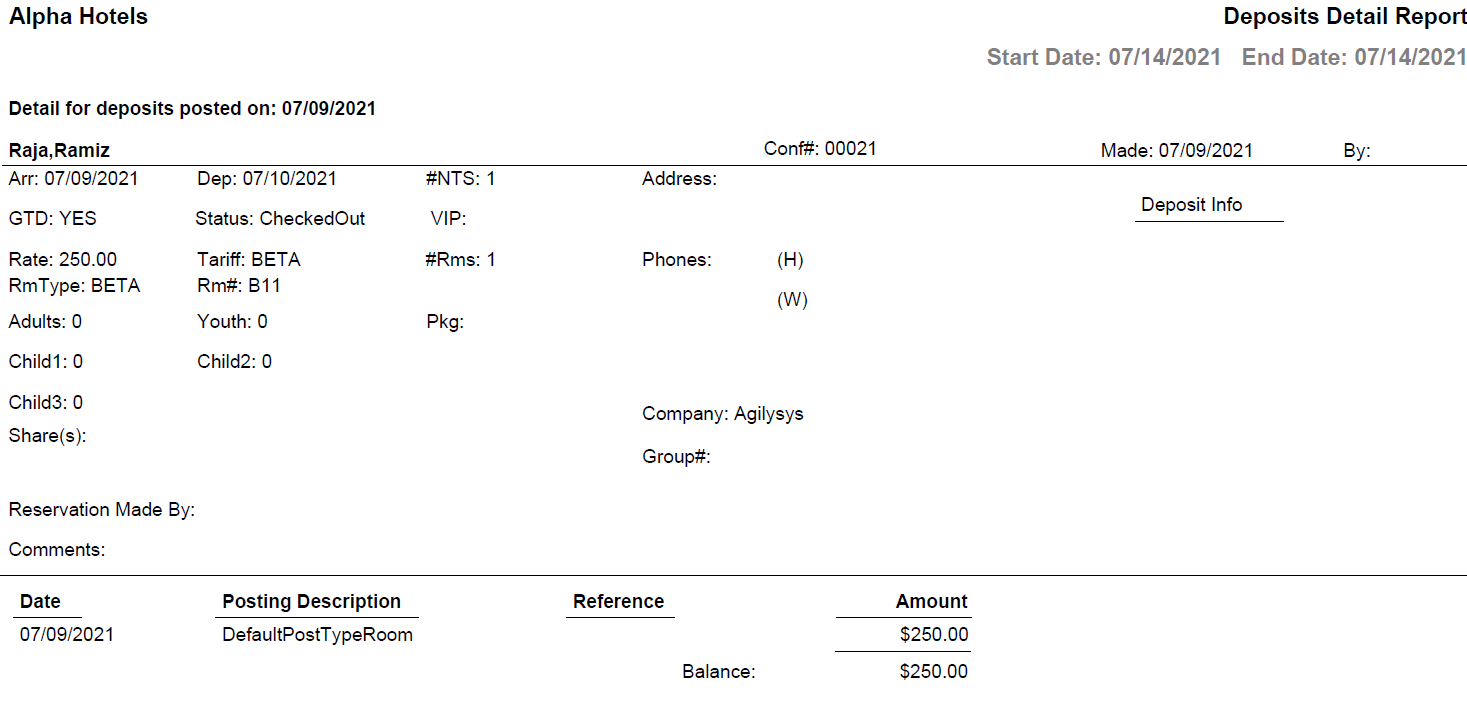
Report Fields
|
Field |
Description |
|---|---|
|
Detail for deposits posted on |
The date selected in parameters. |
|
Conf# |
The confirmation number of the reservation. |
|
Made |
The date on which the reservation was created. |
|
By |
User ID of the user who created the reservation. |
|
Arr |
The arrival date of the guest. |
|
Dep |
The departure date of the guest. |
|
#NTS |
Number of nights of stay. |
|
Address |
The address of the guest. |
|
GTD |
Indicates whether the guest reservation is guaranteed. |
|
Status |
The status of the reservation. |
|
VIP |
The code that identifies the VIP type of the guest at the property. |
|
Rate |
The rate of the room type selected for the reservation.. |
|
Tariff |
The tariff of the preferred room type. |
|
#Rms |
Number of rooms associated with the reservation. |
|
Phones |
(H) - The home phone number of the guest. (W) - The work phone number of the guest. |
|
RmType |
The room type to which the room number belongs. |
|
Rm# |
The room number of the guest. |
|
Adult |
The number of adults on the reservation. |
|
Youth |
The number of youths on the reservation. |
|
Child1 |
Number of children in the child 1 age category. |
|
Child2 |
Number of children in the child 2 age category. |
|
Child3 |
Number of children in the child 3 age category. |
|
Pkg |
The package selected for the reservation. |
|
Share(s) |
Indicates whether the reservation is a shared reservation. |
|
Company |
The name of the company to which the guest belongs. |
|
Group# |
In case of group reservations, the booking ID of the group is displayed here. |
|
Reservation Made By |
The name of the user who created the reservation record. |
|
Comments |
Comments entered by the user, if any. |
|
Date |
The date on which the deposit entry was made on the account. |
|
Posting Description |
Description entered when charges are posted. |
|
Reference |
The reference number or description associated to the charge posted. |
|
Amount |
Amounts credited to the deposit folios will be displayed as negative charges. Amounts transferred or refunded from the deposit folios will be displayed as positive charges. |